
Introduction
All-in-one computers combine a desktop computer and monitor in a single enclosure. This reduces the number of separate components on a desk and makes the setup easier for users who do not want to select a tower, display, speakers and webcam individually. Lenovo IdeaCentre 24 AIO
The Lenovo product sold through the supplied Amazon link is marketed as an “IdeaCentre All-in-One,” but Amazon’s product details identify its model name as V100. Lenovo’s official documentation also calls the product the Lenovo V100 24-inch All-in-One. This naming difference is important because buyers searching for technical documentation, drivers or replacement parts should use the V100 model name.
The listing currently selects the 16GB RAM and 512GB SSD configuration. Amazon also displays 8GB/128GB and 16GB/256GB variants, but it does not show the 8GB/512GB combination stated in the originally supplied product title. Product configurations and prices can change, so the selected variant should always be checked before ordering.
This review does not include invented benchmark scores or simulated test results. Performance assessments are based on the verified processor, graphics, memory, storage and display specifications.
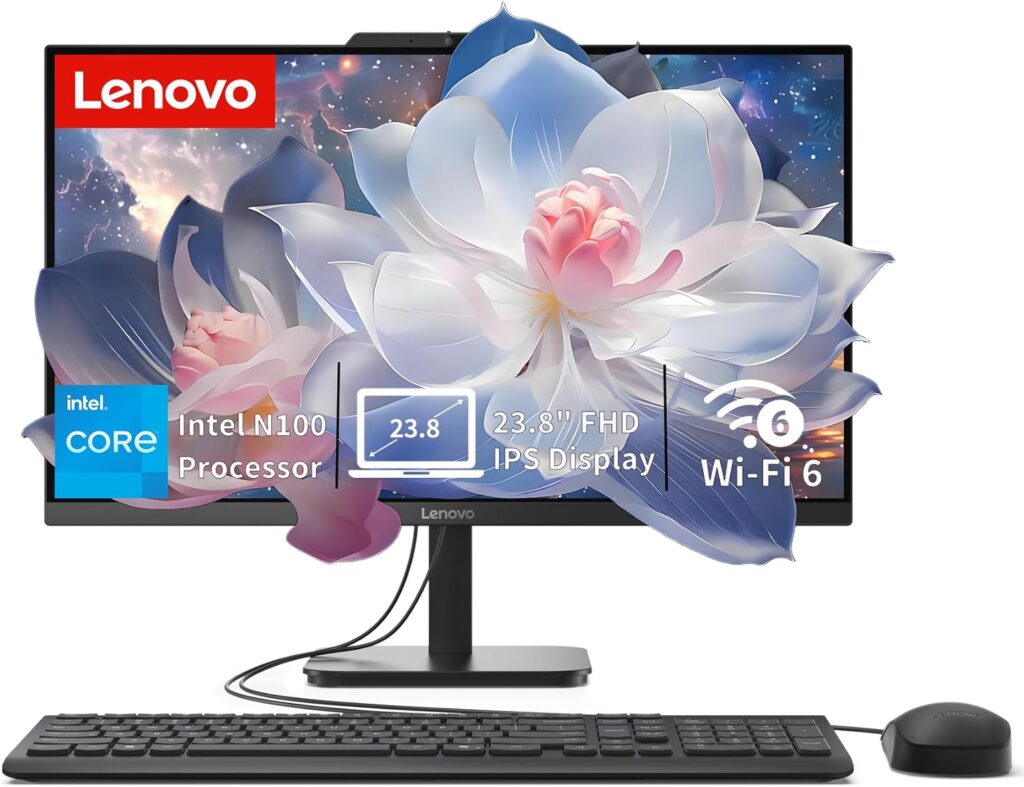
Product Overview: Lenovo IdeaCentre 24 AIO
The Lenovo V100 is officially categorized as a 24-inch all-in-one desktop, although the actual screen measures 23.8 inches diagonally. The computer hardware is installed behind the display, allowing it to operate without a separate tower.
The reviewed Amazon configuration includes:
- Intel N100 four-core processor
- Integrated Intel UHD Graphics
- 16GB DDR4-3200 memory
- 512GB PCIe NVMe M.2 SSD
- 23.8-inch Full HD IPS anti-glare display
- Windows 11 Home
- HD webcam and mono microphone
- Two 2W integrated speakers
- Wi-Fi 6, Bluetooth 5.2 and Gigabit Ethernet
Amazon identifies education, student work and everyday use as the intended applications. Lenovo’s product family documentation confirms the processor, display, memory limit, storage format, port selection and security features.
Key Features: Lenovo IdeaCentre 24 AIO
Space-Saving All-in-One Design
To begin with, the computer and monitor are integrated into a single enclosure. As a result, this design can reduce cable clutter and create a cleaner workspace. In addition, it makes the system easier to install in bedrooms, study areas, reception counters, and small offices. Furthermore, the compact design requires less desk space than a traditional desktop tower and separate monitor. Therefore, it can be a practical choice for users with limited workspace.
23.8-Inch Full HD IPS Display
In addition, Lenovo specifies a 23.8-inch IPS panel with a 1920 × 1080 resolution, an anti-glare coating, 250-nit rated brightness, 99% sRGB color coverage, and a 60Hz refresh rate. As a result, the display should be suitable for everyday productivity, web browsing, streaming, and office work. Furthermore, the IPS panel generally provides wider viewing angles than standard TN displays. However, the panel is non-touch and uses a three-sided narrow-border design. Nevertheless, the slim bezels can give the system a cleaner and more modern appearance.
16GB RAM and 512GB SSD
Likewise, the reviewed Amazon configuration includes 16GB of DDR4 memory and a 512GB PCIe NVMe SSD. As a result, the system should provide a smoother experience when running Windows 11, multiple browser tabs, office applications, and everyday productivity software. In addition, the SSD can improve startup times and application loading compared with a traditional hard drive. However, users with very large media libraries or professional storage requirements may eventually need additional storage.
Modern Network Connectivity
Furthermore, the selected configuration lists Intel Wi-Fi 6 AX203, Bluetooth 5.2, and integrated Gigabit Ethernet. Therefore, users can choose between wireless networking and a wired Ethernet connection. In addition, Wi-Fi 6 can improve wireless efficiency when paired with a compatible router. However, actual network performance will still depend on the router, internet service, signal strength, interference, and local network conditions.
Useful Port Selection
Finally, the V100 family includes USB-C, four USB-A ports, HDMI output, Gigabit Ethernet, and a combined headphone and microphone jack. As a result, users can connect a variety of everyday peripherals without relying heavily on adapters. However, while the USB-C connection is listed for 10Gbps data transfer, Lenovo does not state that it supports Thunderbolt, video output, or USB Power Delivery. Therefore, buyers should verify these features before purchasing if they are important for their intended use.
Full Specifications Table
| Specification | Verified Details |
|---|---|
| Product category | All-in-one desktop computer |
| Official model family | Lenovo V100 |
| Amazon ASIN | B0GYRSHB2F |
| Processor | Intel N100 |
| CPU cores and threads | 4 cores, 4 threads |
| Maximum CPU frequency | Up to 3.4GHz |
| Processor cache | 6MB Intel Smart Cache |
| Graphics | Integrated Intel UHD Graphics |
| Installed memory | 16GB DDR4-3200 |
| Official maximum memory | Up to 16GB |
| Memory slots | One DDR4 SODIMM slot |
| Storage | 512GB PCIe NVMe M.2 SSD |
| Official storage support | One M.2 SSD, up to 512GB in Lenovo-tested configurations |
| Display size | 23.8 inches |
| Resolution | 1920 × 1080 |
| Panel type | IPS |
| Display surface | Anti-glare |
| Rated brightness | 250 nits |
| Color coverage | 99% sRGB |
| Refresh rate | 60Hz |
| Touchscreen | No |
| Webcam | HD camera |
| Microphone | Mono microphone |
| Speakers | Two 2W stereo speakers |
| Wi-Fi | Intel Wi-Fi 6 AX203 on the Amazon configuration |
| Bluetooth | Bluetooth 5.2 |
| Ethernet | Gigabit Ethernet |
| Operating system | Windows 11 Home 64-bit |
| USB-C | One USB-C 10Gbps |
| Fast USB-A | Two USB-A 10Gbps |
| USB 2.0 | Two USB-A |
| Video output | One HDMI 1.4b output |
| Audio port | 3.5mm headphone/microphone combination jack |
| Security chip | Firmware TPM 2.0 |
| Physical security | Kensington Security Slot |
| Power adapter | 65W |
| Color | Eclipse Black |
| Approximate dimensions | 539.3 × 185 × 422.78mm |
| Approximate weight | 4.3kg or 9.47lb |
| Optical drive | None |
| Card reader | None |
The Amazon page lists a maximum RAM capacity of 32GB in one general product-information field. However, the same page’s detailed description and Lenovo’s official PSREF document state that the system supports up to 16GB. Lenovo’s official 16GB figure should be treated as the safer upgrade limit unless the exact machine-type documentation proves otherwise.
Design and Build Quality
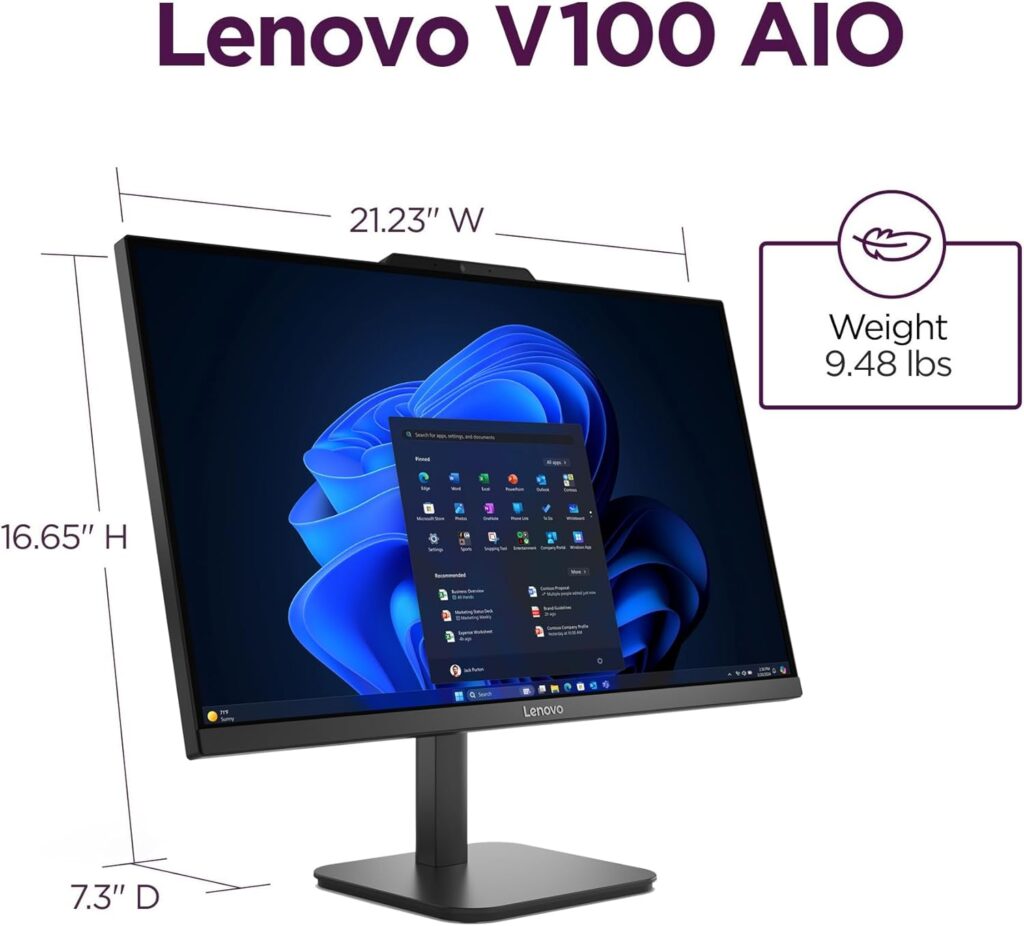
The V100 uses a conventional all-in-one design with a rectangular base, central stand, and computer components positioned behind the display. In addition, Lenovo specifies an Eclipse Black finish and a stand that tilts from approximately -5 degrees to +25 degrees.
Furthermore, the system measures approximately 21.23 inches wide, 7.3 inches deep, and 16.65 inches high with the stand installed. It weighs approximately 9.47 lb. As a result, it is considerably easier to reposition than a desktop tower and a separate full-sized monitor.
However, the stand does not have verified height, swivel, or pivot adjustment. Therefore, users who need the screen at a higher viewing position may need to place the computer on a suitable monitor riser. Lenovo IdeaCentre 24 AIO
The chassis material is not specified by the manufacturer. There is also no verified VESA mounting specification in the official product sheet. Because this review does not include a physical sample, long-term stand stability, panel flex and structural durability have not been independently tested.
Display Quality
The V100’s display is one of its better features. To begin with, its 23.8-inch screen uses an IPS-type panel with Full HD resolution. At this size, the 1920 × 1080 resolution is sufficient for documents, websites, spreadsheets, streaming video, and side-by-side application windows.
In addition, IPS technology generally offers more consistent viewing angles than basic TN panels. According to Lenovo, the screen provides 89-degree viewing angles in all four directions, a 1300:1 contrast ratio, and 99% coverage of the sRGB color space. However, these are manufacturer specifications rather than independent laboratory measurements.
Furthermore, the anti-glare surface can help reduce reflections from windows and overhead lighting. However, the rated 250-nit brightness is relatively modest. As a result, it should be adequate for an indoor desk. On the other hand, it may be less comfortable in a brightly lit room or directly beside a sunny window.
Likewise, the claimed 99% sRGB coverage is promising for general graphics, presentations, and casual photo editing. Nevertheless, Lenovo does not provide a factory calibration report, a Delta E accuracy measurement, or a brightness-uniformity test for the reviewed configuration. Therefore, users who require color-critical accuracy should not assume professional-grade performance without independent testing.
Finally, the 60Hz refresh rate is standard for office computers. As a result, it is suitable for productivity and video playback. However, it will not provide the smoother motion associated with high-refresh gaming monitors.
Display Strengths :Lenovo IdeaCentre 24 AIO
- IPS viewing characteristics
- Full HD resolution
- Anti-glare coating
- Claimed 99% sRGB coverage
- Narrow borders on three sides
Display Limitations
- Only 60Hz
- Non-touch
- Modest 250-nit brightness
- No verified HDR support
- No factory calibration report
CPU Performance
The Intel N100 is an entry-level processor with four cores, four threads, a maximum frequency of 3.4GHz and 6MB of Intel Smart Cache. It is designed for efficient everyday computing rather than demanding professional workloads.
Based on the listed hardware, the Lenovo V100 should be suitable for:
- Microsoft Word, Excel and PowerPoint
- Google Docs and browser-based office tools
- Email and messaging
- Online research
- Video streaming
- Virtual meetings
- Basic bookkeeping
- School portals and learning platforms
- Light file management
The 16GB memory and SSD can help the system feel responsive during ordinary use, but they cannot turn the N100 into a high-performance processor. CPU-intensive applications, large spreadsheets, complex browser workloads and extensive multitasking may expose its limitations.
No benchmark scores are presented because no hands-on benchmark testing was completed. Any specific Cinebench, Geekbench or application score would be unverified for this individual computer.
GPU Performance
Graphics are handled by integrated Intel UHD Graphics. The graphics processor shares the computer’s main system memory and does not include dedicated video memory.
This graphics solution is appropriate for:
- The Windows 11 interface
- Full HD video playback
- Websites and browser applications
- Presentations
- Simple image editing
- Educational applications
- Basic or older games
It is not designed for:
- Modern graphically demanding games
- Professional 3D rendering
- Advanced animation
- Complex computer-aided design
- High-resolution visual-effects work
- GPU-based scientific computing
Lenovo specifies support for the internal display and one external monitor through HDMI output. The maximum external resolution listed in the general family specification is 1920 × 1080 at 60Hz through HDMI 1.4.
RAM and Storage Performance
The reviewed Amazon configuration includes 16GB of DDR4-3200 memory. As a result, this is a more comfortable amount for Windows 11 than 8GB, particularly when users keep several browser tabs, documents, and communication applications open simultaneously.
In addition, Lenovo lists one SODIMM memory slot and an official maximum of 16GB. Therefore, the reviewed configuration appears to be at the manufacturer’s tested memory limit.
Likewise, the 512GB PCIe NVMe M.2 SSD should allow faster startup, application loading, and file access than a traditional mechanical hard drive. However, the exact SSD brand, controller, NAND type, and measured read or write speeds are not specified by the manufacturer. Consequently, real-world performance may vary depending on the specific SSD installed.
Furthermore, a 512GB drive is sufficient for Windows, office software, and a moderate collection of personal files. However, users storing extensive video, photo, or game libraries may need an external USB drive, network storage, or cloud storage. Alternatively, they may need to upgrade their storage capacity if supported by their specific configuration.
Gaming Performance: Lenovo IdeaCentre 24 AIO
The Lenovo V100 should not be considered a gaming desktop.
To begin with, the Intel N100 and integrated UHD Graphics may run browser games, older PC games, and lightweight titles that have modest hardware requirements. However, users may need to select a lower resolution and reduced graphics settings, depending on the game. As a result, the overall gaming experience will vary between different titles.
Furthermore, no FPS figures are provided because performance varies by game title, software version, resolution, graphics settings, cooling, and background activity. Therefore, publishing estimated FPS numbers without independent testing would be misleading.
On the other hand, modern AAA games, advanced simulations, and graphics-intensive competitive titles require a substantially stronger processor and a dedicated graphics card. In addition, the V100 has a 60Hz display and no documented dedicated-GPU upgrade path. Consequently, it is not designed for demanding gaming workloads.
Alternatively, cloud gaming services may operate through the browser because most of the processing is handled on remote servers. However, their quality will depend on internet speed, latency, network stability, and the selected service rather than the local graphics processor. Therefore, a fast and reliable internet connection is essential for the best possible experience.
Video Editing Performance
The V100 can reasonably be used for basic video tasks such as:
- Trimming short Full HD clips
- Combining a small number of videos
- Adding simple text and transitions
- Creating school presentations
- Preparing short social-media videos
However, the Intel N100 is not intended for complicated timelines, multiple high-resolution video layers, intensive effects or frequent 4K exports. Applications such as Adobe Premiere Pro, DaVinci Resolve and After Effects can demand considerably more CPU and graphics performance.
Professional video editors should choose a system with a stronger Core i5, Core Ultra 5, Ryzen 5 or better processor. Depending on the software and project, a dedicated graphics card may also be necessary.
Video export times are not specified by the manufacturer, and no editing benchmark was conducted for this review.
Programming and Office Performance
Programming
The V100 is adequate for introductory programming and small development projects involving:
- HTML and CSS
- JavaScript
- Python fundamentals
- C or C++ coursework
- Basic Java applications
- Visual Studio Code
- Git and GitHub
- Small local databases
The 16GB RAM configuration gives users enough memory for an editor, documentation and browser tabs. The processor may struggle with Android emulators, multiple virtual machines, extensive Docker environments, large code compilations or professional game-development tools.
Office Productivity
Office work is the strongest use case for this computer. It should be comfortable for:
- Documents and reports
- Presentations
- Web applications
- Basic financial records
- Online meetings
- Standard spreadsheets
- Printing and scanning
The HDMI output also allows users to connect a second monitor, which can improve productivity when working across several documents or browser windows.
AI Performance: Lenovo IdeaCentre 24 AIO
Lenovo does not list a dedicated neural processing unit (NPU) for the Intel N100 configuration. Therefore, dedicated NPU performance and AI acceleration figures are not specified by the manufacturer.
However, the computer can still access cloud-based artificial intelligence services through a web browser because those services generally process requests on remote servers. For example, these services include online writing assistants, chat services, and cloud image tools. Lenovo IdeaCentre 24 AIO
On the other hand, this system is not suitable for demanding local AI development, training neural networks, or running large generative models on the device. This is because there is no dedicated GPU and no verified AI TOPS rating.
Cooling and Fan Noise
The cooling-system design, fan size, operating temperature, and acoustic output are not specified by the manufacturer.
First of all, Lenovo does not publish detailed information about the cooling-system design, fan size, operating temperature, or acoustic output for this configuration.
Furthermore, no physical thermal or noise testing was conducted. Therefore, it would be inaccurate to describe the V100 as silent or to provide specific temperature and decibel values. Instead, any such figures would require independent testing under controlled conditions.
In addition, as with any all-in-one computer, ventilation openings should be kept clear. Otherwise, dust accumulation, room temperature, and sustained processor use can affect operating temperature and fan behaviour.
Moreover, placing the computer on a stable, well-ventilated surface can help maintain consistent airflow. As a result, the cooling system may operate more efficiently during normal workloads.
However, cooling performance can still vary depending on the surrounding environment. For example, high ambient temperatures, restricted airflow, or prolonged processor-intensive tasks may increase internal temperatures and fan activity.
Likewise, regular cleaning can help reduce dust buildup over time. Consequently, maintaining proper airflow may contribute to more consistent long-term performance. Nevertheless, without independent thermal and acoustic testing, no specific temperature or noise claims can be verified.
Webcam and Microphone :Lenovo IdeaCentre 24 AIO
The reviewed Amazon configuration lists an HD camera and mono microphone. However, Lenovo’s broader V100 family can be configured with an HD camera and single microphone, a 5MP camera and dual-microphone array, or no camera and microphone. Therefore, buyers should verify the selected Amazon configuration rather than assuming that every V100 has identical multimedia hardware.
For most users, an HD webcam should be sufficient for ordinary online classes and business meetings. However, the exact resolution, frame rate, and low-light performance are not specified by the manufacturer.
A physical webcam privacy shutter, infrared facial recognition and Windows Hello facial login are also not specified for this configuration.
Speakers: Lenovo IdeaCentre 24 AIO
The Lenovo V100 includes two integrated 2W stereo speakers and high-definition audio.
These speakers should be adequate for video calls, spoken content, notifications and casual video streaming. However, Lenovo does not provide verified frequency-response, distortion or maximum-volume measurements.
Users who prioritize music, films or fuller sound should consider headphones or external speakers.
Ports and Connectivity: Lenovo IdeaCentre 24 AIO
| Connection | Quantity | Practical Use |
| USB-C 10Gbps | 1 | External storage and compatible USB-C accessories |
| USB-A 10Gbps | 2 | Fast external drives and modern peripherals |
| USB-A 2.0 | 2 | Keyboard, mouse, printer and basic accessories |
| HDMI 1.4b output | 1 | Connecting an external monitor |
| Gigabit Ethernet | 1 | Wired network connection |
| 3.5mm audio combination jack | 1 | Headphones, headset or microphone |
| Power connector | 1 | Connecting the 65W adapter |
Lenovo places these connections on the rear of the computer. The USB-C port is identified as a USB 10Gbps data connection. DisplayPort support, USB-C charging, Thunderbolt and USB Power Delivery are not specified by the manufacturer.
The HDMI port is an output, not an input. It can connect the computer to an additional monitor, but the official specifications do not indicate that the V100 can function as a display for a game console or another computer.
Wireless Connectivity: Lenovo IdeaCentre 24 AIO
The Amazon configuration lists Intel Wi-Fi 6 AX203 with a 2×2 antenna configuration and Bluetooth 5.2. In addition, Lenovo also confirms Gigabit Ethernet through an RJ-45 port.
As a result, Wi-Fi 6 can provide improved wireless efficiency when paired with a compatible router. However, actual network performance will still depend on the router, internet service, distance, interference, and local network conditions.
Upgrade Options: Lenovo IdeaCentre 24 AIO
The V100 has limited internal expansion compared with a standard desktop tower.
Lenovo officially lists:
- One SODIMM memory slot
- Up to 16GB of memory
- One M.2 SSD
- Up to 512GB of Lenovo-tested storage
- One separate M.2 slot occupied by the wireless adapter
- No conventional internal drive bays
Because the reviewed configuration already includes 16GB RAM and a 512GB SSD, it is at Lenovo’s stated tested limits for both components.
A physically larger replacement SSD might work in some circumstances, but compatibility beyond Lenovo’s tested 512GB capacity is not officially verified in the family specification. Users should consult the exact machine-type documentation before purchasing parts.
Opening an all-in-one computer is generally more complicated than opening a desktop tower. Internal upgrades should be performed only after reviewing Lenovo’s service instructions and warranty conditions.
Software Experience: Lenovo IdeaCentre 24 AIO
The Amazon configuration comes with Windows 11 Home 64-bit. However, Lenovo’s wider V100 family can also be sold with Windows 11 Pro, Windows 11 Home Single Language, or without a preinstalled operating system.
Additionally, the exact selection of preinstalled Lenovo utilities and third-party applications is not specified by the manufacturer for this Amazon listing.
Likewise, a permanent Microsoft Office license is not specified. Therefore, buyers should not assume that desktop versions of Word, Excel, and PowerPoint are included unless the seller clearly identifies a licensed Office package.
Security Features: Lenovo IdeaCentre 24 AIO
The verified security features include:
- Firmware TPM 2.0
- Kensington Security Slot
- Power-on password support
- Supervisor password support
- BIOS Smart USB protection
Smart USB protection can be configured to allow a keyboard and mouse while blocking USB storage devices. This may be useful in shared office, reception or institutional environments.
A fingerprint reader, infrared facial-recognition system and dedicated privacy shutter are not specified for the reviewed configuration.
Real-World Usage: Lenovo IdeaCentre 24 AIO
Students
The V100 is suitable for homework, research, virtual classes, reports, presentations and beginner-level programming. Its main disadvantage for students is the lack of portability.
Home Users
It can serve as a shared household computer for browsing, streaming, video calls, document storage and online services.
Office Users
The system is appropriate for email, data entry, browser-based business tools, standard spreadsheets and customer-service work. The Gigabit Ethernet connection may be useful in offices that prioritize stable wired networking.
Professionals
Professionals with light administrative workloads may find it sufficient. Users working with large datasets, engineering software, complex financial models or intensive multitasking should select a stronger processor.
Developers
It is acceptable for learning and small projects but not ideal for large software builds, multiple virtual machines, local AI models or extensive containerized development.
Content Creators
Basic image adjustments and simple Full HD videos are possible. Professional photo editing, 4K video production, 3D design and animation require more powerful hardware.
Casual Gamers
The integrated graphics are suitable only for older, lightweight or browser-based games. This is not a gaming-focused computer.
Performance Summary
| Workload | Expected Suitability |
| Web browsing | Good |
| Email and documents | Good |
| Online classes | Good |
| Video meetings | Good |
| Standard spreadsheets | Good |
| Streaming video | Good |
| Basic programming | Acceptable |
| Casual photo editing | Acceptable |
| Simple Full HD video editing | Limited |
| Heavy multitasking | Limited |
| 4K video production | Poor |
| Modern gaming | Poor |
| 3D rendering | Poor |
| Local AI workloads | Poor |
| Virtual machines | Limited |
These evaluations are expectations derived from the verified hardware. They are not measured benchmark results.
Pros
- Space-saving all-in-one design
- 23.8-inch Full HD IPS display
- Anti-glare screen surface
- Claimed 99% sRGB coverage
- 16GB RAM in the current Amazon configuration
- 512GB PCIe NVMe SSD
- Wi-Fi 6 and Bluetooth 5.2
- Gigabit Ethernet
- USB-C and four USB-A ports
- HDMI output for a second monitor
- Firmware TPM 2.0
- Built-in webcam, microphone and speakers
Cons
- Entry-level Intel N100 processor
- No dedicated graphics card
- Limited official memory and storage expansion
- Only one memory slot
- 60Hz display
- No touchscreen
- No card reader
- No optical drive
- No verified HDMI input
- No verified webcam privacy shutter
- Cooling and fan noise are not specified
- Amazon product naming and configuration details are inconsistent
Who Should Buy It?
The Lenovo V100 is best suited to people who need a simple, fixed computer for:
- Office documents and email
- Online learning
- Web browsing
- Video conferencing
- Basic bookkeeping
- Family use
- Reception or front-desk work
- Light programming
- Streaming media
It is especially appealing when desk space and ease of installation matter more than maximum performance.
Who Should Avoid It?
This system is not the right choice for users who need:
- Modern high-quality gaming
- Professional video production
- Advanced photo processing
- Engineering or architecture software
- Large software compilations
- Multiple virtual machines
- GPU rendering
- Local AI development
- Extensive internal upgrades
- Laptop portability
Frequently Asked Questions
1. Is the Lenovo IdeaCentre 24″ All-in-One good for everyday use? Yes. Based on its verified specs — a 4-core processor, 8GB RAM, and a fast 512GB PCIe SSD — it’s built for everyday tasks like browsing, office work, and video calls.
2. Can this Lenovo AIO run games? No dedicated graphics card is specified, and 8GB RAM is limited for gaming. It’s not recommended for modern gaming.
3. Is 8GB RAM enough in 2026? It’s enough for light, everyday multitasking, but it’s the entry-level tier. Heavier multitasking will feel more comfortable on 16GB.
4. Does this AIO include a webcam? Not specified by the manufacturer for this listing — verify on the product page if webcam quality matters to you.
5. What operating system does it run? Windows 11 Home, pre-installed.
6. Is the display good for office work? Yes — a 24″ FHD IPS anti-glare panel is a comfortable choice for extended browsing and document work, reducing glare in bright rooms.
7. Can I upgrade the RAM later?
Not specified by the manufacturer — don’t assume upgradability without confirming with the seller first.
8. Does it support Wi-Fi 6? Yes, along with Bluetooth 5.2, both current wireless standards.
9. Is this suitable for video editing? Not recommended for serious video editing due to the 8GB RAM ceiling and unconfirmed GPU.
10. Is this a good computer for students? Yes, for typical student tasks like research, writing, and video calls, it should be a solid, simple choice.
11. How much storage does it have? 512GB on a PCIe SSD, which is both fast and reasonably spacious for everyday use.
12. Does it come with a keyboard and mouse? Not specified by the manufacturer for this exact listing — check the listing’s included-accessories section before buying.
13. Is this a gaming PC? No. It’s marketed and specified as an everyday-use all-in-one desktop, not a gaming machine.
14. How does this compare to a laptop for the same tasks? An AIO desktop like this typically offers a larger screen and more comfortable long-term ergonomics than a budget laptop, at the cost of portability.
15. Why do similar Amazon listings show different specs? Multiple third-party sellers list closely related AIO designs with varying RAM/CPU configurations under similar titles — always verify the exact spec table on the listing you’re purchasing from.
Review Methodology
This review is based on information available from the supplied Amazon product page and Lenovo’s official Product Specifications Reference and support documentation.
No physical review unit was supplied. Hands-on benchmarks, temperature measurements, display calibration tests, power-consumption tests and acoustic measurements were not conducted.
Statements about practical performance are reasonable capability expectations based on the verified processor, graphics, memory and storage. They are not presented as measured test results.
Limitations :Lenovo IdeaCentre 24 AIO
The Amazon listing contains a configuration mismatch. The product name supplied for this article states 8GB RAM and a 512GB SSD, while the live page currently defaults to 16GB RAM and a 512GB SSD.
Amazon also uses the IdeaCentre name in its title while identifying the model as V100 in the product details.
The exact SSD manufacturer, RAM module brand, display calibration, cooling design, fan noise, webcam frame rate and included warranty service are not completely specified for this seller configuration.
The listing describes a wired Calliope keyboard and mouse in its product description, but Amazon’s separate “What’s in the box” section lists only the computer. Buyers should confirm the included accessories before ordering.
Affiliate Disclosure
This article may contain affiliate links. If you purchase through these links, we may earn a small commission at no additional cost to you.
Final Verdict: Lenovo IdeaCentre 24 AIO
The Lenovo V100 is a practical all-in-one desktop for light home, education and office work. It offers a useful 23.8-inch IPS display, 16GB RAM, a 512GB SSD and modern network connectivity in a compact design that requires less desk space than a separate tower and monitor.
Its Intel N100 processor is adequate for documents, browsing, streaming and online meetings, but it provides limited performance for demanding creative work, gaming, advanced development and professional multitasking. Upgrade options are also restricted because the reviewed configuration is already at Lenovo’s stated memory and storage limits.
This computer is a reasonable choice for users who value simplicity and need only basic performance. Buyers who can increase their budget should compare it with Core i3, Core 3 or Ryzen 5 all-in-one systems before making a final decision