
Introduction
Finding a compact laptop is easy. Finding one that combines portability, visual quality, and serious processing power is harder.This Dell XPS 14 Premium Laptop review examines a machine designed for demanding everyday users. It pairs a 14.5-inch 3.2K OLED touchscreen with an Intel Core Ultra 7 255H processor. You also get integrated Intel Arc graphics, 32GB of fast memory, and a 1TB solid-state drive. Dell XPS 14 Premium DA14250
That combination makes it particularly attractive for professionals, university students, content creators, and frequent travelers. The high-resolution display should suit visual work, entertainment, and detailed multitasking. Meanwhile, the generous memory and modern processor support heavier workflows than a basic ultraportable can comfortably manage.
Its premium construction is another important reason to consider it. Dell uses machined aluminum and Gorilla Glass 3, while keeping the listed weight at 3.8 pounds. However, buyers should understand that this configuration relies on integrated graphics. It also offers mostly USB-C-based connectivity rather than a wide selection of traditional ports.
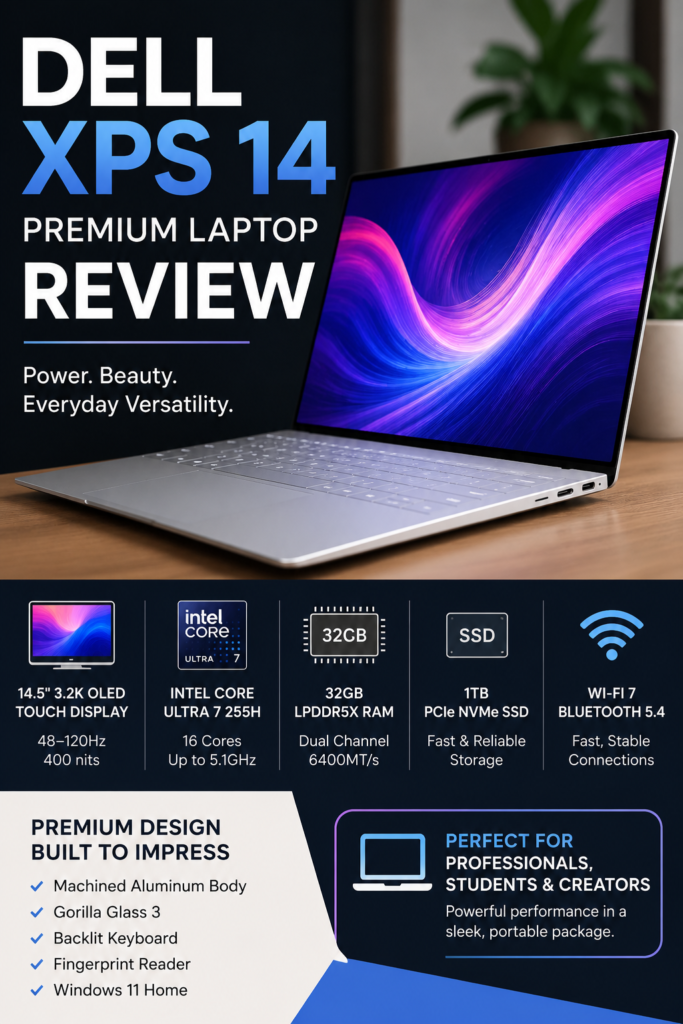
Dell XPS 14 Premium Laptop DA14250 Overview
The Dell XPS 14 Premium DA14250 sits in Dell’s higher tier of consumer laptops, built around Intel’s Core Ultra Processors Series 2. This specific configuration includes an Intel Core Ultra 7 255H chip, 32GB of memory, a 1TB SSD, and a 14.5-inch 3.2K OLED touchscreen with a 48-120Hz refresh rate.
The display uses Dell’s InfinityEdge design with Low Blue Light technology, and it hits 400 nits of brightness with a 3200 x 2000 resolution. Graphics duties are handled by Intel Arc integrated graphics, which shares system memory rather than using dedicated video memory. Security comes from a fingerprint reader built into the keyboard deck, and the keyboard itself is backlit for typing in low light.
Connectivity is modern throughout, with WiFi 7 support, Bluetooth 5.4, and three Thunderbolt 4 ports for fast data transfer and external displays. The laptop also includes a microSD card reader, a 3.5mm audio jack, and a 60W USB-C power adapter in the box.
Specifications at a Glance
| Feature | Specification |
|---|---|
| Display | 14.5-inch 3.2K OLED touchscreen |
| Resolution | 3200 × 2000 |
| Refresh rate | Variable 48–120Hz |
| Brightness | 400 nits |
| Processor | Intel Core Ultra 7 255H |
| Processor configuration | 16 cores, up to 5.1GHz |
| Graphics | Integrated Intel Arc graphics |
| Memory | 32GB LPDDR5X dual-channel |
| Memory speed | 6400MT/s |
| Storage | 1TB M.2 PCIe NVMe SSD |
| Operating system | Windows 11 Home |
| Wireless | Wi-Fi 7 and Bluetooth 5.4 |
| Battery capacity | 69.5Wh, six-cell lithium-ion |
| Charger | 60W USB-C adapter |
| Weight | 3.8 pounds |
| Color | Platinum |
Key Features of the Dell XPS 14 Premium Laptop
3.2K OLED Touchscreen
The 14.5-inch OLED display is the strongest reason to consider this configuration. Its 3200 × 2000 resolution should render text, images, and interface elements with excellent detail.
OLED technology can display individual pixels without relying on a traditional backlight. The sales page highlights clearer, more vibrant images and a wider color range. This makes the display especially relevant for photography, video, digital artwork, and high-quality entertainment.
Touch support adds another way to navigate Windows, browse documents, and interact with creative applications. However, the listing does not mention stylus support or an included pen.
Variable 48–120Hz Refresh Rate
The screen can adjust between 48Hz and 120Hz. A higher refresh rate makes scrolling, animations, and moving content appear smoother.
The variable system can also reduce the refresh rate during static activities. Dell says this helps improve battery efficiency while viewing web pages or still images. This balance matters because a high-resolution OLED panel can otherwise consume considerable power.
Intel Core Ultra 7 255H Processor
The Core Ultra 7 255H is listed with 16 cores and turbo speeds reaching 5.1GHz. Those specifications position the laptop for more than basic browsing and document editing.
It should be well suited to demanding multitasking, large spreadsheets, programming environments, research applications, and creative software. Dell also promotes the processor’s built-in AI capabilities for supported Windows and application features. Dell XPS 14 Premium Laptop
Actual speed will still depend on cooling, power settings, and the software being used. The Amazon page does not provide independently measured benchmark results.
Integrated Intel Arc Graphics
Intel Arc graphics handle visual processing without a separate graphics card. This arrangement helps Dell maintain a thinner, more portable design.
The graphics should support high-resolution media, everyday creative work, and compatible GPU-accelerated applications. Dell also presents the platform as suitable for portable creativity and gaming. However, this particular configuration does not include a dedicated GPU.
Buyers focused on advanced 3D rendering or consistently demanding games may prefer a laptop with dedicated graphics memory.
32GB of Fast Memory
The laptop includes 32GB of LPDDR5X dual-channel memory rated at 6400MT/s. That is a generous capacity for a compact premium laptop.
It allows more applications, browser tabs, documents, and background processes to remain open simultaneously. This can make a noticeable difference during research, editing, coding, or complex office work.
The Amazon listing does not clearly explain whether the memory can be upgraded later. Buyers who need future expansion should confirm this before ordering.
1TB PCIe NVMe SSD
The 1TB M.2 PCIe NVMe SSD provides a practical balance between storage capacity and responsiveness. It offers room for software, professional files, personal media, and larger project folders.
Solid-state storage also avoids the moving components found in traditional hard drives. This supports faster file access while making the laptop more suitable for travel.
Backlit Keyboard and Fingerprint Reader
The backlit English QWERTY keyboard is useful in darker classrooms, offices, flights, and bedrooms. Fingerprint recognition offers a convenient way to access the computer without repeatedly entering a password.
The product page also highlights a modern interior and a seamless glass haptic touchpad. Dell describes the touchpad as providing precise, responsive feedback across the palm-rest area.
Dell XPS 14 Premium DA14250 Review Performance
Based on the verified specifications, the Core Ultra 7 255H processor and 32GB of memory position this laptop for demanding productivity work, moderate creative tasks like photo editing, and smooth multitasking. The Intel Arc integrated graphics are suitable for everyday visual work, media playback, and light creative projects, though they are not designed for serious gaming or heavy 3D rendering.
The Intel AI Boost NPU adds efficiency for AI-assisted software, which is increasingly common in office suites, editing tools, and communication apps. Combined with the fast 1TB PCIe NVMe SSD, boot times and application launches should feel responsive rather than sluggish, since NVMe drives read and write data far quicker than older storage types.
This Dell XPS 14 Premium DA14250 review focuses only on the manufacturer-listed specifications, since no independent benchmark results were verified for this exact configuration. If raw gaming performance or heavy 3D rendering speed is your top priority, it’s worth comparing this configuration against models that include a dedicated graphics card.
Design & Build Quality
The laptop follows Dell’s premium XPS design language, with a slim profile measuring about 0.71 inches thick and weighing roughly 4.03 pounds. That combination keeps it manageable to carry daily without feeling like a burden in a backpack.
The InfinityEdge display design keeps bezels thin, which makes the screen feel larger relative to the laptop’s overall footprint. The backlit keyboard adds comfort for typing in dim environments, and the built-in fingerprint reader offers a quick, secure way to log in without typing a password every time. Dual array digital microphones and stereo speakers with a dedicated subwoofer round out a build that feels considered rather than stripped down.
Battery Life & Connectivity
Dell equips this laptop with a 6-cell battery and includes a 60W USB-C power adapter for charging, which also means you can top up the battery using many standard USB-C chargers and power banks, not just the included one.
On the connectivity side, this configuration includes WiFi 7 support through a 2×2 Killer wireless card, along with Bluetooth 5.4 for fast, stable wireless connections to peripherals. Three Thunderbolt 4 ports handle everything from external displays to high-speed storage, and the microSD card reader is a convenient touch for anyone who shoots photos or video and needs to offload files quickly. A 3.5mm audio jack is also included for wired headphones or external audio gear.
Benefits of the Dell XPS 14 Premium Laptop
The primary benefit is versatility. This is one computer that can handle productivity, entertainment, study, and creative tasks without feeling designed for only one purpose.
Its display offers practical value for anyone who regularly works with detailed visual content. The OLED panel, 3.2K resolution, touch support, and variable refresh rate provide a more premium viewing experience than a basic office screen.
The 32GB memory capacity is another major advantage. Buyers can run demanding applications and multitask without immediately worrying about limited memory.
Portability also remains reasonable. The 14.5-inch screen offers more workspace than many 13-inch laptops, while the 3.8-pound weight remains manageable for frequent transport.
Finally, features such as fingerprint recognition, a backlit keyboard, Wi-Fi 7, Bluetooth 5.4, Thunderbolt connectivity, and a microSDXC reader improve everyday convenience.
Pros and Cons of Dell XPS 14 Premium Laptop DA14250
Pros
- Vibrant 3.2K OLED touchscreen with a smooth 48-120Hz refresh rate
- Strong 16-core Core Ultra 7 255H processor for multitasking and productivity
- 32GB of fast LPDDR5X memory
- Three Thunderbolt 4 ports for versatile connectivity
- WiFi 7 and Bluetooth 5.4 for modern wireless performance
- Backlit keyboard and fingerprint reader included
- Relatively slim and light for its screen size
Cons
- Memory is soldered and cannot be upgraded after purchase
- Intel Arc integrated graphics are not built for serious gaming or heavy 3D work
- No dedicated graphics card in this configuration
- Battery capacity is not listed in detail, so runtime expectations depend on real-world testing
Who Should Buy the Dell XPS 14 Premium Laptop?
This laptop makes the most sense for professionals who want strong performance without carrying a large workstation. Its display, memory, storage, and premium construction fit business users who value both appearance and capability.
University students can also benefit from it, particularly those studying design, computer science, engineering, media, business, or research-focused subjects. The 32GB memory provides useful breathing room for demanding software and long-term use.
Photographers, designers, and video creators should appreciate the OLED touchscreen and high resolution. However, buyers with demanding 3D rendering or professional GPU workloads should compare it with a dedicated-graphics model.
It is also suitable for people who want one premium laptop for work and entertainment. The screen and audio features support streaming, while the processor and memory support serious productivity.
Budget-focused shoppers may prefer a lower-resolution laptop with less memory. Likewise, anyone needing built-in HDMI, Ethernet, or several traditional USB-A ports may find this design too dependent on adapters and docks.
Frequently Asked Questions About the Dell XPS 14 Premium Laptop
Does the Dell XPS 14 have an OLED touchscreen?
Yes. This configuration includes a 14.5-inch 3.2K OLED touchscreen with a native 3200 × 2000 resolution.
What is the refresh rate of the display?
The display supports a variable refresh rate ranging from 48Hz to 120Hz. It can lower the rate during static viewing and increase it for smoother motion.
Is the Dell XPS 14 OLED laptop good for creative work?
Its OLED display, 32GB memory, Core Ultra 7 processor, and Intel Arc graphics make it suitable for photo editing and moderate video work. Advanced GPU-heavy workloads may require dedicated graphics.
Does this model have dedicated graphics?
No. The listed Intel Arc graphics are integrated and use shared system memory.
How much memory and storage does it include?
This configuration includes 32GB of LPDDR5X memory and a 1TB M.2 PCIe NVMe SSD.
Does the Dell DA14250 support Wi-Fi 7?
Yes. The product information lists Wi-Fi 7 and Bluetooth 5.4 connectivity. Compatible networking equipment is needed to access Wi-Fi 7 capabilities.
What ports are included?
The sales page shows Thunderbolt 4 USB-C connections, a microSDXC reader, and a universal audio jack. However, its illustrated and technical port counts conflict, so buyers should confirm the exact number.
How long does the battery last?
The listing includes a 69.5Wh battery but does not provide a specific runtime for this configuration. Battery duration will depend on display settings, software, and workload.
Final Verdict: Is the Dell XPS 14 Premium Laptop Worth It?
This Dell XPS 14 Premium Laptop review shows a well-equipped premium computer with several meaningful strengths. Its 3.2K OLED touchscreen, variable 120Hz refresh rate, Core Ultra 7 processor, 32GB memory, and 1TB SSD create a strong combination for demanding everyday use.
It is especially compelling for professionals, students, and creators who value display quality and portability. The machined-aluminum construction, fingerprint reader, Wi-Fi 7, haptic touchpad, and Thunderbolt connectivity further support its premium positioning.
The main limitation is the integrated graphics. They should handle normal productivity and moderate creative tasks, but they cannot replace a dedicated GPU for every workload. The Amazon page also leaves some questions unanswered, including exact battery runtime, memory upgradeability, and the precise number of Thunderbolt ports.
Overall, this is a strong choice for buyers seeking a premium touchscreen laptop with a beautiful display and generous memory. Its value will depend heavily on the current selling price. Before ordering, confirm the port configuration and compare the cost with dedicated-graphics alternatives if creative performance is your main priority.