Introduction
A reliable keyboard and mouse are essential for everyday computer use, whether you work from home, attend online classes, manage office tasks, or browse the internet. However, dealing with multiple cables can make an ordinary computer setup less convenient. Logitech MK270 Review
The Logitech MK270 Full Size Wireless Keyboard and Mouse Combo offers a simple solution by combining a full-size keyboard and a compact wireless mouse in one package. Its 2.4 GHz wireless connection, dedicated multimedia shortcuts, and advertised long battery life make it worth considering for everyday productivity.
But does it offer everything a regular computer user needs? And are there any limitations worth knowing before purchasing?
This review explores its features, practical benefits, compatibility, advantages, and disadvantages to help you make an informed decision.
Looking for a simple wireless keyboard and mouse setup? Check its current availability and price below.
Product Overview : Logitech MK270 Review
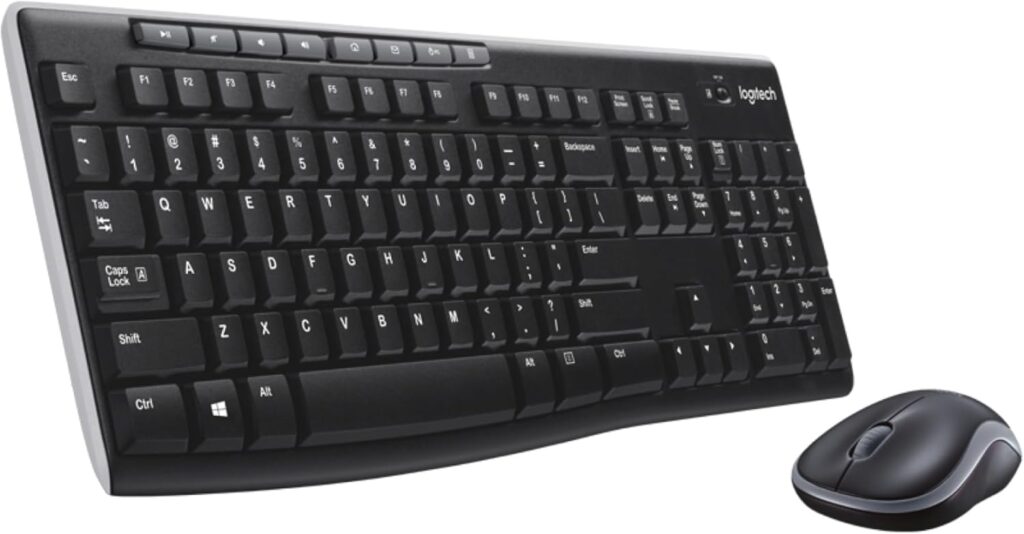
The Logitech MK270 is a wireless keyboard and mouse combination designed primarily for home and office computing. Instead of purchasing a keyboard and mouse separately, users receive both devices together, along with a small USB wireless receiver.
The keyboard features a standard full-size layout with function keys, arrow keys, and a numeric keypad. These features make it practical for people who regularly type documents, enter numerical information, manage spreadsheets, or perform administrative tasks.
The accompanying mouse has a compact, ambidextrous design, making it suitable for both left-handed and right-handed users.
Main Product Details
| Specification | Details |
|---|---|
| Brand | Logitech |
| Model | MK270 |
| Color | Black |
| Keyboard | Full-size wireless |
| Mouse | Compact wireless |
| Connectivity | 2.4 GHz wireless |
| Receiver | USB Nano receiver |
| Wireless range | Up to 33 ft (10 m) |
| Keyboard battery life | Up to 36 months |
| Mouse battery life | Up to 12 months |
| Multimedia shortcuts | 8 |
| Keyboard design | Spill-resistant |
| Intended use | Home and office |
Specifications are based on published product information. Actual performance may vary depending on usage and operating conditions.
Key Features and Real-World Benefits
1. Full-Size Keyboard for Everyday Productivity
One of the main advantages of the MK270 is its full-size keyboard layout.
Unlike smaller compact keyboards, it includes:
- Standard typing keys.
- Dedicated function keys.
- Full-size arrow keys.
- A separate numeric keypad.
- Eight multimedia shortcut keys.
The numeric keypad is particularly useful for people who regularly work with spreadsheets, financial records, calculations, and numerical data.
For students and office employees, the familiar keyboard arrangement makes everyday typing and data entry convenient.
2. Reliable 2.4 GHz Wireless Connectivity
The Logitech MK270 uses a 2.4 GHz wireless connection through a small USB Nano receiver.
The advertised wireless operating range reaches up to 33 feet (10 meters), although actual performance may vary depending on the surrounding environment.
This setup reduces desktop cable clutter and allows users to position their keyboard and mouse more freely.
Another practical advantage is that both devices connect through one receiver rather than requiring separate wireless receivers.
However, the receiver uses USB-A. Computers with USB-C-only ports will need a compatible USB-C-to-USB-A adapter.
3. Eight Multimedia Shortcut Keys
The keyboard includes eight dedicated multimedia shortcuts.
These controls provide convenient access to frequently used functions, including:
- Internet access.
- Email.
- Play and pause.
- Volume adjustment.
- Other media-related functions.
For someone who frequently switches between typing documents, listening to music, and browsing websites, these shortcuts can reduce the need to navigate through menus.
They are especially useful in everyday office and home environments.
4. Long Advertised Battery Life
Battery replacement is an important consideration when choosing wireless computer accessories.
According to the published specifications, the Logitech MK270 offers:
- Keyboard: Up to 36 months.
- Mouse: Up to 12 months.
Both devices also feature on/off switches, allowing users to turn them off when they are not needed.
These figures are manufacturer estimates rather than guaranteed operating periods. Actual battery performance depends on usage and computing conditions.
Nevertheless, the advertised battery life makes the MK270 an appealing option for people who prefer wireless accessories without frequent battery changes.
5. Spill-Resistant Keyboard Design
Accidental liquid spills can damage ordinary computer keyboards.
The MK270 addresses this concern with a spill-resistant keyboard design.
Logitech specifies that the keyboard has been tested under limited conditions involving a maximum of 60 ml of liquid spillage.
However, spill-resistant does not mean waterproof. Users should not immerse the keyboard in water or deliberately expose it to large amounts of liquid.
For a typical home or office desk, this additional protection is a useful design consideration.
6. Compact and Ambidextrous Wireless Mouse
The included mouse features a compact, contoured shape designed for comfortable everyday navigation.
Its ambidextrous design makes it suitable for both left-handed and right-handed users.
For general activities such as browsing, document editing, online learning, and office applications, this type of mouse provides the basic functionality most users need.
Design, Build Quality, and Ease of Use : Logitech MK270 Review
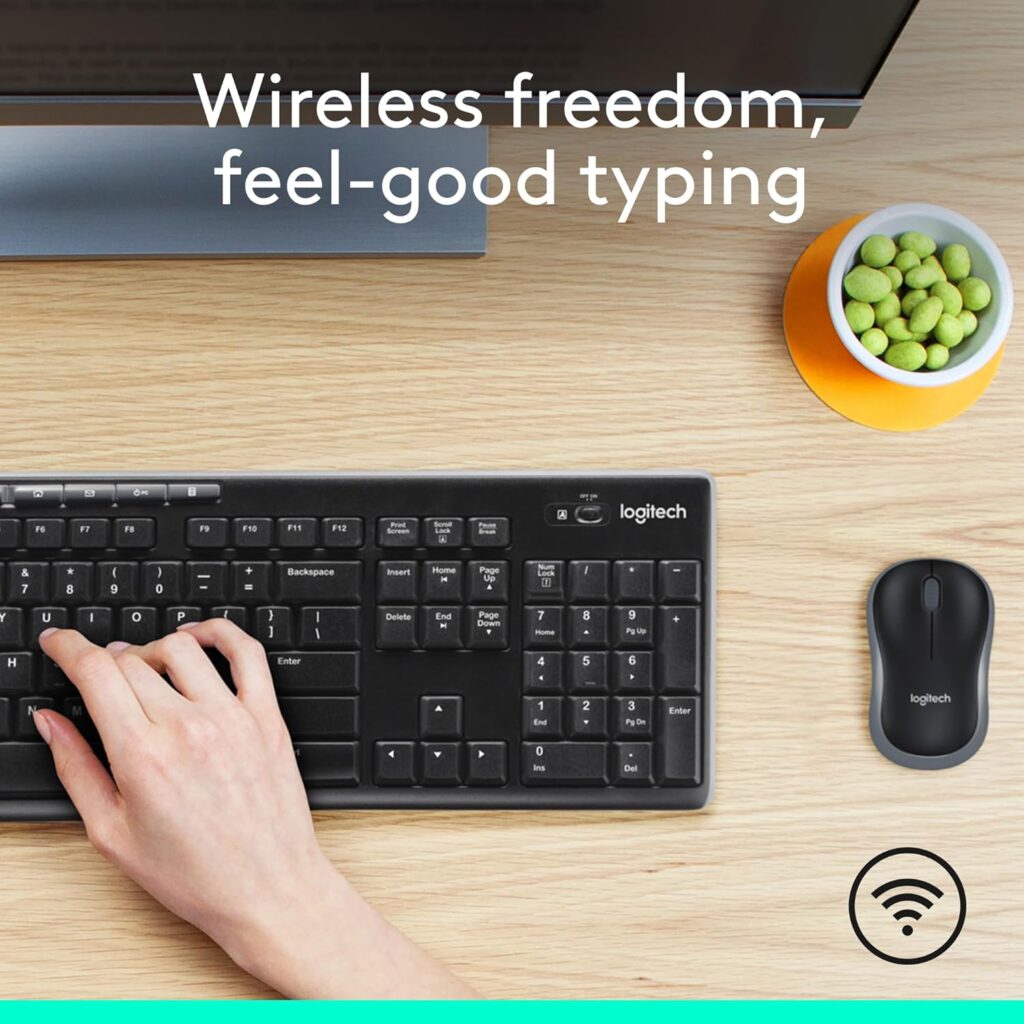
The Logitech MK270 follows a simple, traditional computer accessory design.
Its black finish gives the keyboard and mouse a neutral appearance that fits naturally into most office and home workspaces.
The keyboard includes sturdy tilt legs with adjustable height, allowing users to change its typing angle. Its standard layout also avoids the adjustment period that can come with smaller or unusually arranged keyboards.
The low-profile, quiet keys are another practical consideration for people working in shared environments.
The mouse is smaller than a conventional full-size desktop mouse, which helps keep the overall setup compact.
However, users who prefer larger mice or specialized ergonomic designs may find the included mouse less suitable for extended working sessions. Logitech MK270 Review
Overall, the design prioritizes simplicity and everyday functionality rather than advanced customization or premium ergonomics.
Performance and Compatibility : Logitech MK270 Review
Wireless Performance
The MK270 uses Logitech’s 2.4 GHz wireless technology and a USB Nano receiver.
The manufacturer advertises a wireless range of up to 10 meters (33 feet).
This provides flexibility for ordinary desktop arrangements and setups where users do not want their keyboard and mouse physically connected to the computer. Logitech MK270 Review
The receiver also supports a straightforward plug-and-play setup, making installation relatively simple.
Operating System Compatibility : Logitech MK270
Compatibility deserves attention before purchasing.
The specific Amazon listing identifies laptop and PC compatibility and lists Windows 10 as its minimum required operating system version.
Logitech’s technical documentation for different MK270 variants also identifies support for:
- Windows.
- macOS.
- ChromeOS.
- Linux.
However, the MK270 family contains different keyboard, mouse, and receiver combinations with varying specifications.
Therefore, Mac, ChromeOS, and Linux users should verify compatibility with the exact model being purchased. Multimedia shortcut functionality may also differ between operating systems. Logitech MK270 Review
USB Receiver Requirement Logitech MK270
The MK270 does not use a Bluetooth-only connection. Both devices communicate through the included USB-A Nano receiver.
This means:
- A computer with a USB-A port can connect directly.
- A USB-C-only laptop requires a compatible adapter.
- A Bluetooth-only connection is not an alternative setup method for this product.
Buyers should consider this requirement if they use a modern laptop with limited USB-A connectivity.
Pros and Cons of Logitech MK270
Pros
- Full-size keyboard with a dedicated numeric keypad.
- Wireless keyboard and mouse included in one package.
- Single USB Nano receiver for both devices.
- Advertised wireless range of up to 33 feet.
- Eight convenient multimedia shortcut keys.
- Long advertised keyboard and mouse battery life.
- Spill-resistant keyboard design.
- Compact ambidextrous mouse.
- Adjustable keyboard tilt legs.
- Straightforward plug-and-play setup.
Cons
- Requires a USB-A receiver rather than Bluetooth connectivity.
- USB-C-only computers need an additional adapter.
- The compact mouse may not suit users who prefer larger mice.
- The keyboard does not provide a dedicated ergonomic wrist rest.
- It is not a rechargeable keyboard and mouse combination.
- Spill resistance does not provide waterproof protection.
- Advanced compatibility and shortcut functionality should be checked for non-Windows systems.
Who Should Buy the Logitech MK270?
The Logitech MK270 is particularly suitable for people who need a straightforward wireless keyboard and mouse for everyday computing.
1. Students and Online Learners
Students who regularly prepare assignments, attend online classes, browse educational resources, and write documents may appreciate the full-size keyboard and wireless mouse. Logitech MK270 Review
The numeric keypad can also help with calculations and numerical data entry.
2. Home Office Users
People working from home can benefit from having two essential computer accessories connected through one USB receiver.
The wireless arrangement also helps keep the workspace less cluttered.
3. Office Employees and Administrative Professionals
The full-size layout, numeric keypad, and multimedia shortcuts make the combination suitable for general administrative tasks, document preparation, and spreadsheet work.
4. Everyday Computer Users
Anyone who primarily uses a computer for browsing, email, document editing, and routine activities may find the MK270’s feature set sufficient.
5. Buyers Looking for a Simple Wireless Setup
People who want both a keyboard and mouse without purchasing separate devices may appreciate the convenience of this combination.
Who Should Consider Alternatives?
Although the Logitech MK270 covers everyday computing needs, it is not designed to satisfy every type of user.
Consider another product if:
- You prefer Bluetooth connectivity: A Bluetooth keyboard and mouse combination may be more convenient if you want to avoid using a USB receiver.
- You need an ergonomic setup: Look for a keyboard with a dedicated wrist rest or a specialized ergonomic mouse.
- You prefer rechargeable accessories: Consider a rechargeable wireless keyboard and mouse instead of replaceable-battery models.
- You work in low-light environments: A keyboard with adjustable backlighting may be more appropriate.
- You need advanced gaming features: Dedicated gaming peripherals offer specialized controls and performance-oriented features.
- You have a USB-C-only laptop: A USB-C-compatible wireless combination may provide a simpler connection without an additional adapter.
Choosing the right alternative depends on your actual working habits rather than simply selecting a product with more features.
Important Things to Check Before Buying
Before placing an order, consider these points:
1. Check the USB Connection Logitech MK270
Confirm that your computer has a USB-A port or that you already own a compatible USB-C adapter.
2. Confirm Operating System Compatibility
Windows users have the clearest compatibility information on the linked Amazon listing. Mac, ChromeOS, and Linux users should verify the exact MK270 variant.
3. Check the Product Model
The Amazon listing identifies model 920-008813. Check the product information and packaging to ensure you receive the intended version.
4. Review the Battery Information
The published battery-life estimates are up to 36 months for the keyboard and 12 months for the mouse. Actual performance can vary.
5. Confirm the Warranty
Check the warranty terms applicable to the seller and product variant before purchasing.
6. Review the Included Accessories
Check the current Amazon listing for the precise package contents, including the keyboard, mouse, USB receiver, batteries, and user documentation.
Is the Logitech MK270 Worth Buying?
The Logitech MK270 offers a practical combination of features for people who need a traditional keyboard and mouse without complicated installation.
Its biggest strengths are its full-size keyboard, numeric keypad, eight multimedia shortcuts, single USB wireless receiver, and advertised long battery life.
The spill-resistant keyboard design provides an additional layer of everyday protection, while the compact ambidextrous mouse makes the combination suitable for different users.
However, its USB-A receiver requirement is an important limitation for people using newer USB-C-only laptops. The compact mouse and lack of advanced ergonomic features may also influence the buying decision.
Whether it is worth purchasing ultimately depends on your requirements and the current price.
If you need a basic wireless setup for everyday home or office work, its published feature set covers many common requirements. If you need Bluetooth, rechargeable batteries, backlighting, or advanced ergonomic functionality, comparing other models would be sensible.
Final Verdict: Should You Choose Logitech MK270?
The Logitech MK270 Full Size Wireless Keyboard and Mouse Combo is a practical option for buyers who prioritize simplicity, familiar keyboard controls, and convenient wireless connectivity.
Its full-size keyboard, numeric keypad, eight multimedia shortcuts, and advertised battery life make it relevant for students, home office users, and people performing everyday computer tasks.
Its limitations are equally important: it relies on a USB-A Nano receiver, comes with a compact mouse, and does not offer the specialized features found in more advanced keyboard and mouse combinations.
Our verdict: Consider the Logitech MK270 if you want a straightforward wireless keyboard and mouse package for everyday computing. Before purchasing, confirm USB connectivity, operating system compatibility, and the current warranty and seller details.
Ready to see the latest availability and purchasing options?